 Product · Enterprise IT
EOIP
Know your network. Govern your AI. Keep it sovereign.
Enterprise Operations Intelligence Platform. Network health, security alerts, and AI use in one view, so leaders see one picture and teams work from one list of priorities. It runs in your own data centre or a UAE data centre.
The problem it closes
AI arrived faster than anyone could manage it. Staff use AI assistants with tools nobody approved, sometimes with customer or confidential data. AI agents now change systems and data. Banks, government, and healthcare are expected to show they govern AI, with evidence. Most organisations cannot answer which AI they use, whether each use is approved, or prove it without weeks of spreadsheets.
One place for your network, your security, and your AI.
- See everythingNetwork health, security alerts, and AI use in one view.
- Govern AIEvery use of AI has an owner, a risk rating, and an approval.
- Stay in controlAI suggests, people decide. Nothing risky happens on its own.
- Prove itEvidence for auditors and regulators, ready in minutes.
What it does
7 modules that work on the same record. Choose one to read more.
Module 1 of 7
AI discovery
A live list of the AI services, assistants, and agents your organisation actually uses, found from the sources you connect. Unapproved AI is flagged so you can approve, replace, or stop it.
Real screens
From the working product. Select a screen to open it full size.
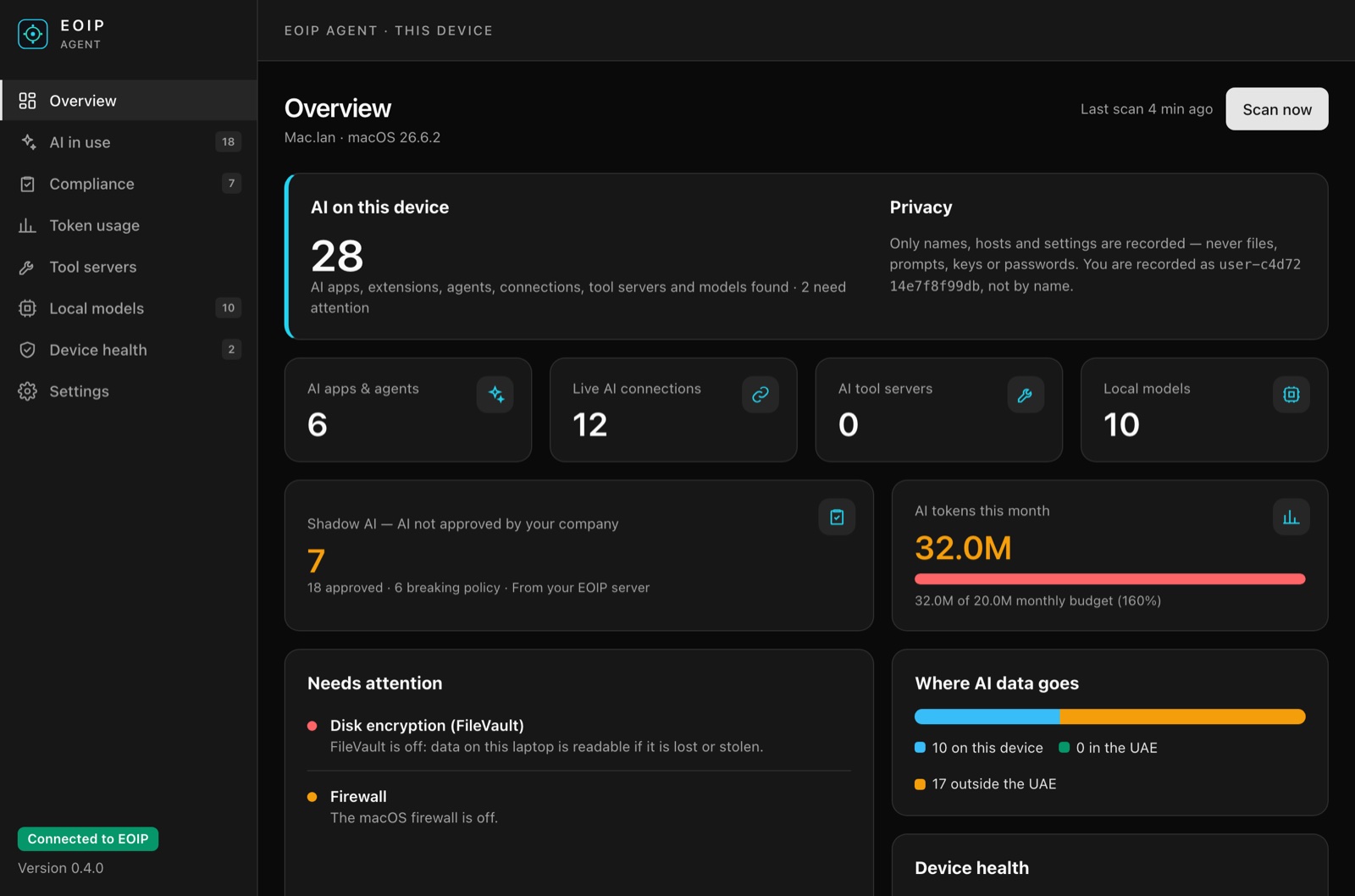
EOIP Agent 0.4 on the laptop: AI found, Shadow AI, token budget, where AI data goes, and what needs attention.
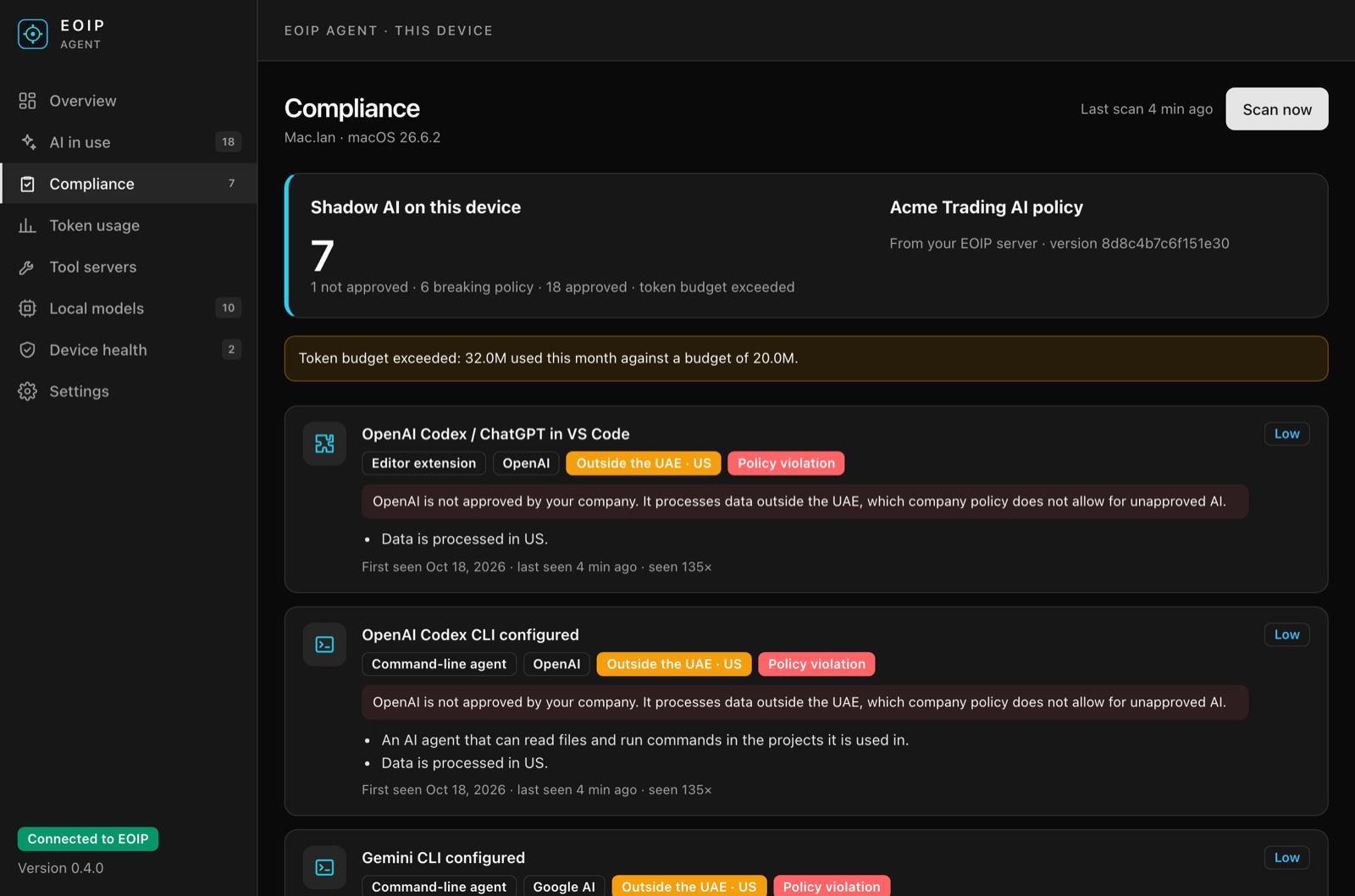
Compliance against the company AI policy, with the reason for every policy violation.
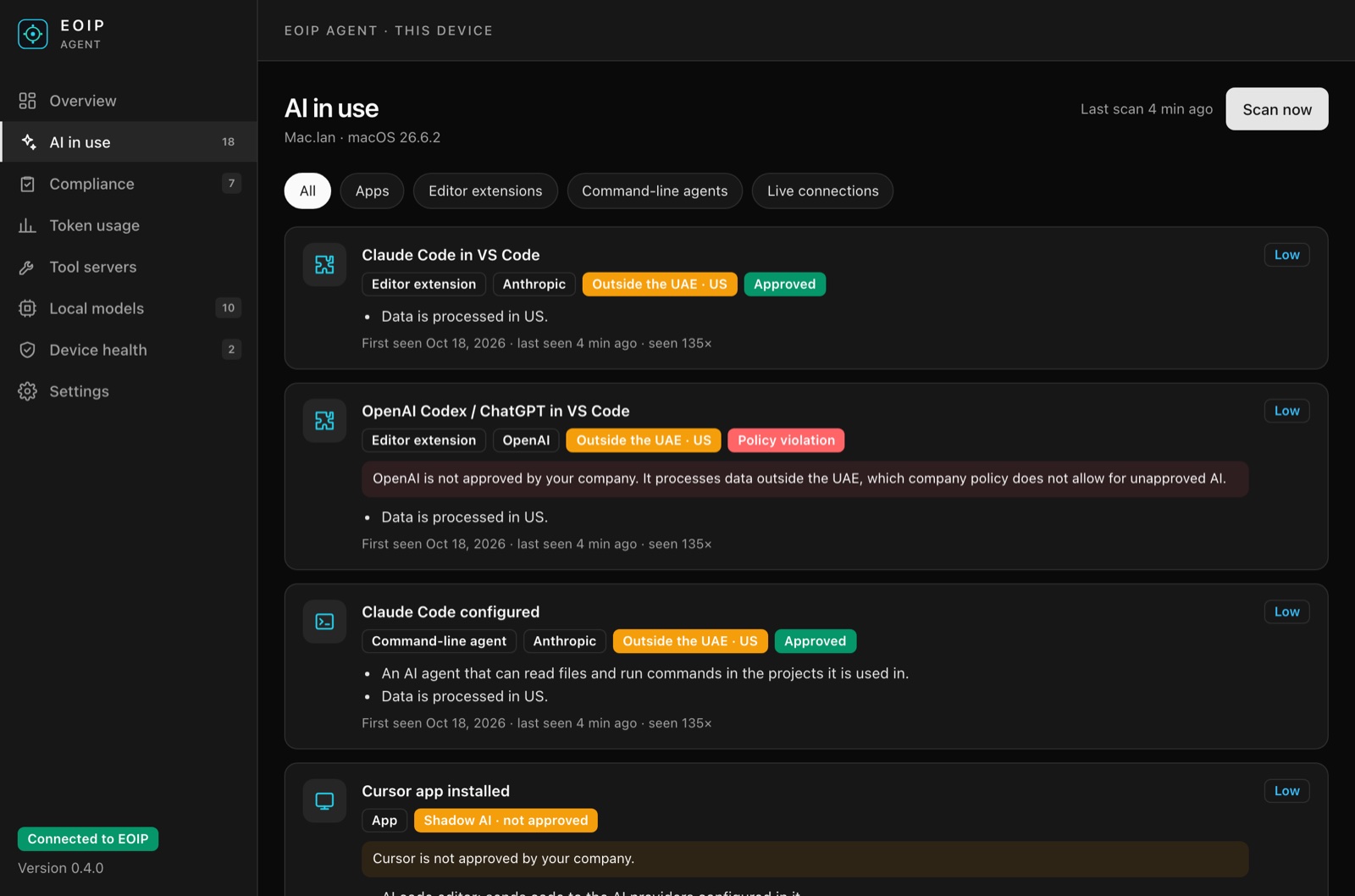
AI apps, editor extensions, command-line agents, and live connections, each approved or not.
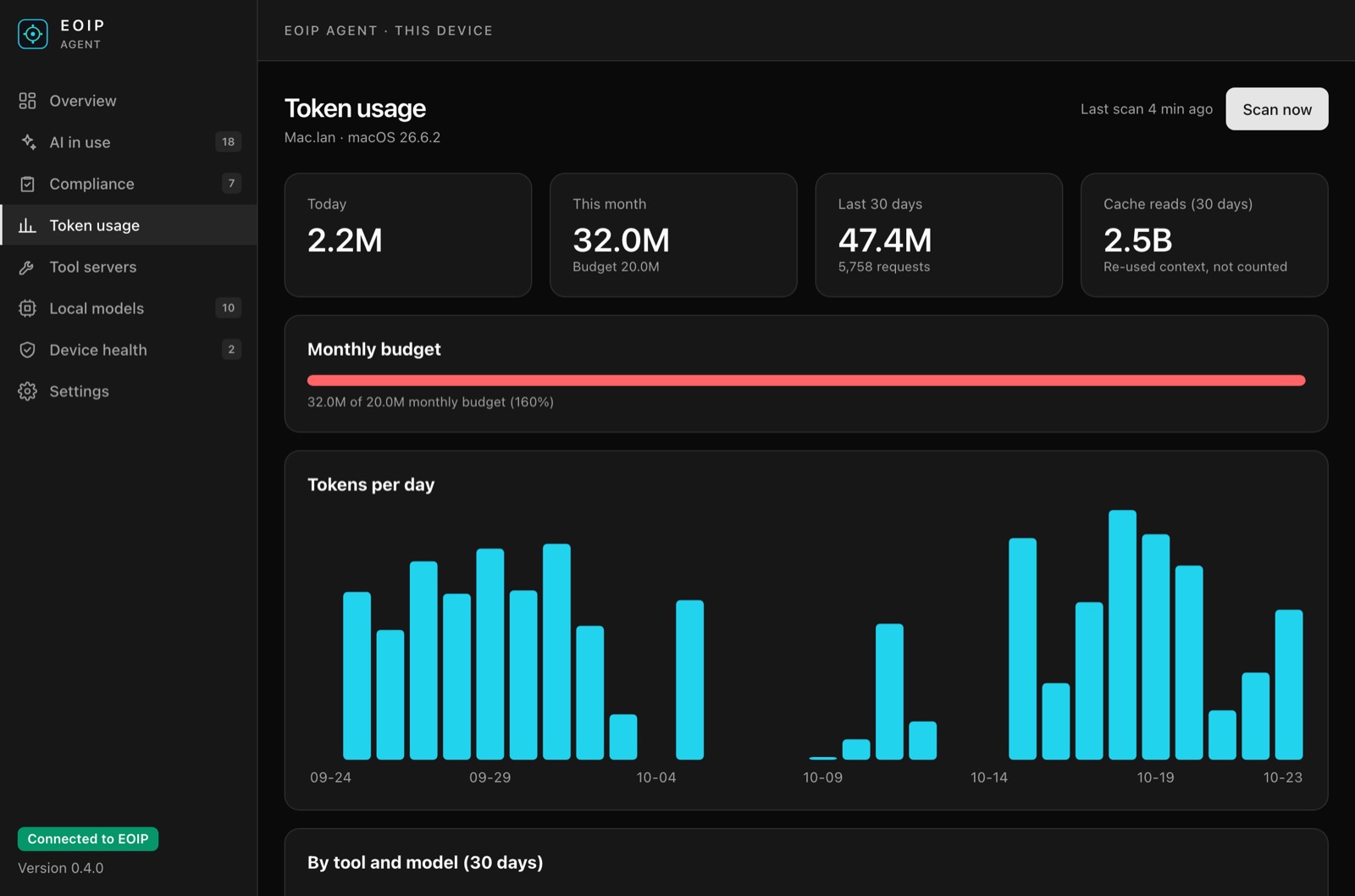
Token usage today, this month, and over 30 days, against the monthly budget.
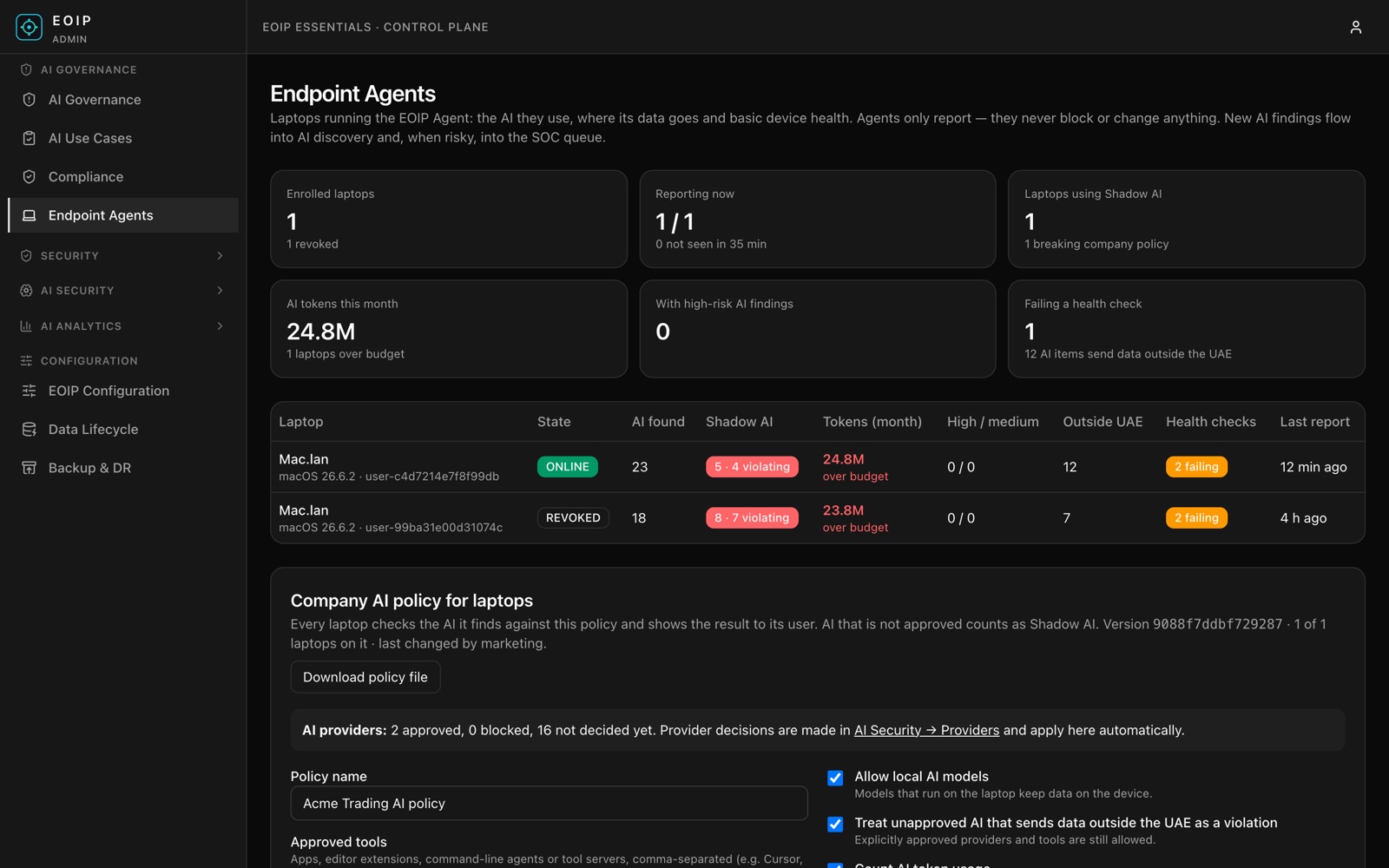
For IT and security: the whole fleet, Shadow AI, budgets, and failing health checks.
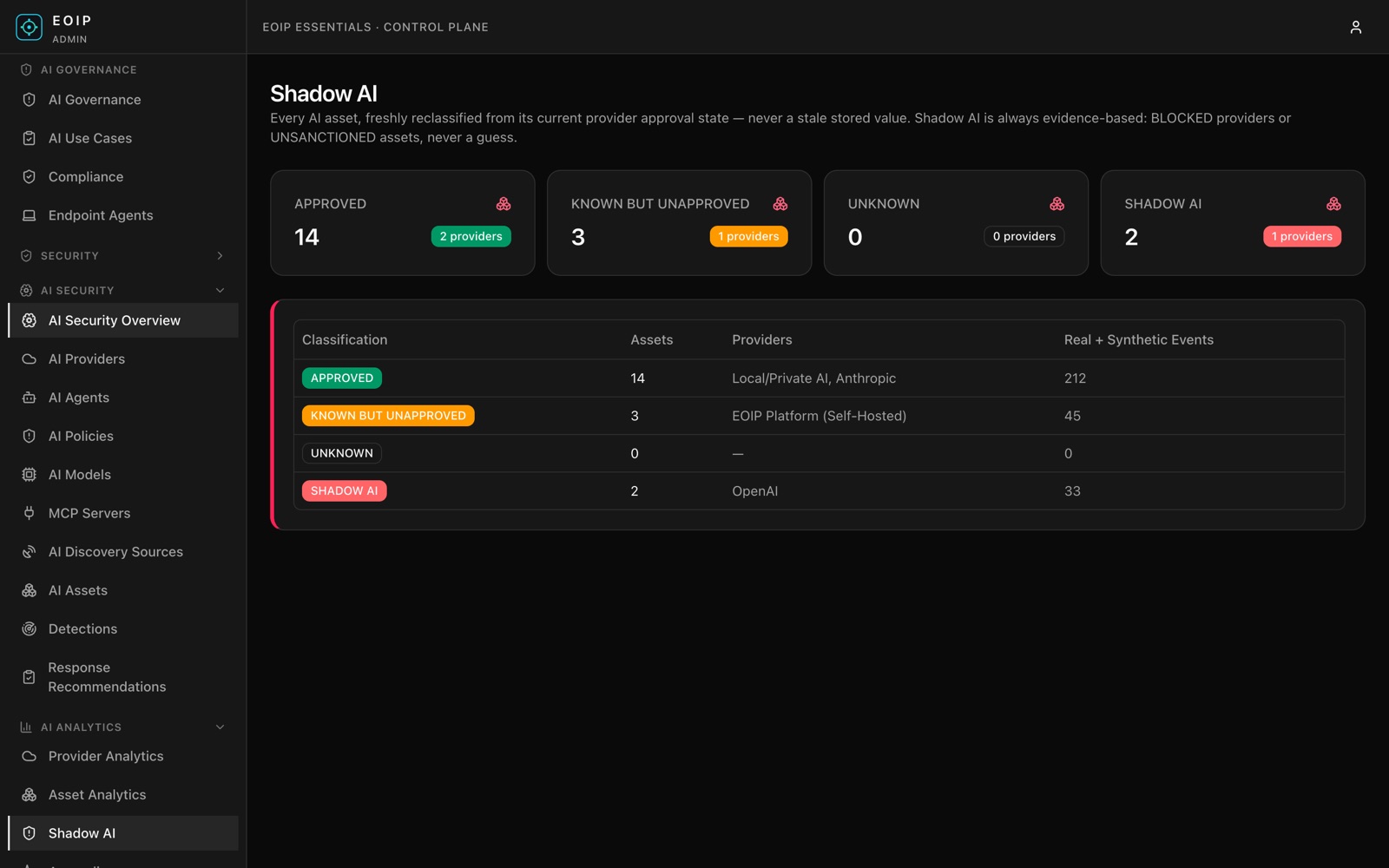
Shadow AI by provider: what is approved and what is not.
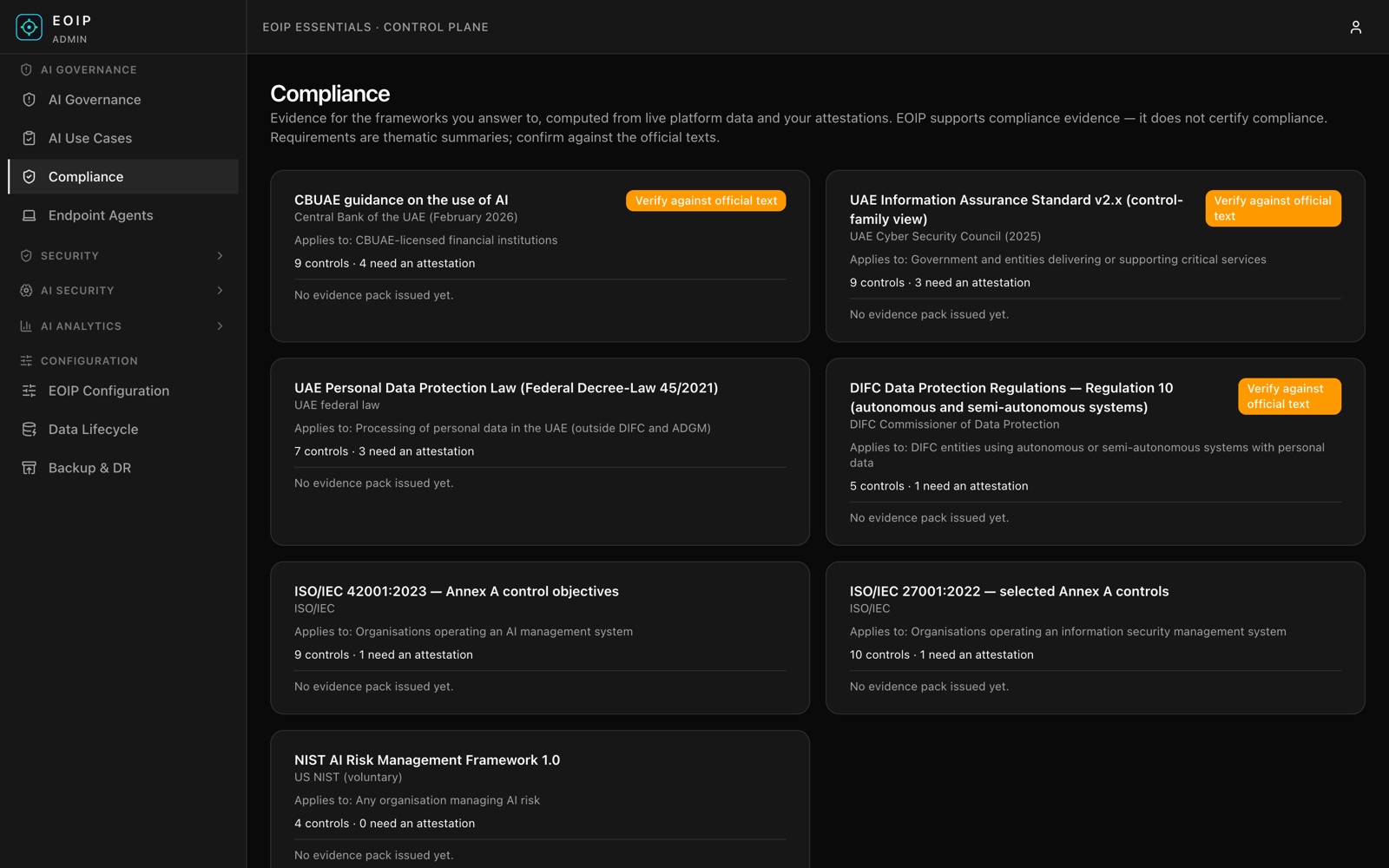
Compliance evidence mapped to CBUAE, UAE IA, PDPL, DIFC, ISO 42001/27001, and NIST AI RMF.
Every use of AI gets an owner, a risk rating, and an approval
- Step 1RegisterName the use, the purpose, and the person accountable.
- Step 2Rate the riskTen plain questions give a clear risk level, with the reasons.
- Step 3ApproveThe right people sign off, two of them for high-risk uses.
- Step 4ReviewA review date is set: sooner for higher risk.
- Step 5WatchAI found in use without approval is flagged automatically.
Prove it
Evidence for auditors and regulators.
Clear answers per requirement, built from what actually happens. EOIP produces the evidence; your organisation remains responsible for compliance.
- Central Bank of the UAE: AI guidance
- UAE Information Assurance Standard
- UAE Personal Data Protection Law
- DIFC rules for autonomous systems
- ISO 42001 (AI management)
- ISO 27001 (information security)
- NIST AI Risk Management Framework
Technical details
- Agent
- EOIP Agent 0.4. macOS 12 or later (Apple silicon and Intel), verified. Windows 10 and 11, in pilot.
- Agent footprint
- One ~10 MB program. Full scan in 0.3 s using ~25 MB memory, every 15 minutes at low priority.
- Installation
- Per-user install, no administrator rights. Intune, Jamf, and other device-management tools supported.
- Privacy
- Metadata only. Users recorded as a pseudonymous code. Reports are signed; a laptop can be revoked in one click.
- Where it runs
- Your own server or a UAE data centre, including fully offline. Nothing is sent to Sanyaa.
- Essentials server
- Target size 4 vCPU, 8 GB RAM, 80 GB disk. Available now to pilot customers.
Who it is for
- Banks and financial institutions
- Government and semi-government
- Healthcare providers
- Telecom and managed-service providers
- CIO, CISO, and compliance
Plain about scope
What to expect, and what not to
We would rather you know before the demo than after the contract.
- If EOIP cannot see something, it says so. It never shows a reassuring guess.
- The laptop agent never reads what people write: no prompts, answers, files, keys, or passwords. It detects and reports; it never blocks or changes anything.
- The agent is verified on macOS 12 or later. Windows 10 and 11 are in validation with pilot customers. There is no Linux agent.
- EOIP produces the evidence. Your organisation remains responsible for compliance.
- It runs in your own data centre or a UAE data centre, even fully offline. Nothing is sent to Sanyaa.
Plans
Start small and grow. Choose a plan to request a quote.
Shadow AI Check
Free14 days
The EOIP agent on up to 25 laptops, standalone. No server needed. One per organisation.
- AI in use and Shadow AI
- Where AI data goes
- Token usage and device health
- Report with a draft AI policy
- Most chosen
EOIP Essentials
Quote on request
AI governance for growing businesses, on a small server on your premises. For teams of up to 50 laptops, and more.
- Central fleet view and company AI policy
- AI inventory and use-case register
- Compliance evidence packs and audit trail
- Security incidents for high-risk AI
EOIP Enterprise
Quote on request
The sovereign operations platform: everything in Essentials plus network and security operations, AIOps, and the Command Centre.
- NOC, SOC, and Command Centre
- AI security and data-leakage detection
- Full observability and data platform
- Air-gapped sovereign option
How it starts
- 01
Free Shadow AI Check: 14 days on up to 25 laptops, no server needed, with the report in a review meeting.
- 02
AI Visibility Assessment: four weeks in your environment, with a report for your board.
- 03
EOIP Essentials for up to 50 laptops, or a 90-day pilot of Enterprise with our engineers alongside.
Walkthrough
Request an AI Visibility Assessment.
Pick a time and we confirm by email or WhatsApp within one business day.
- WhatsApp UAE · +971 54 330 6162Fastest reply. Chat with our UAE team now.
- WhatsApp India · +91 97406 64707Chat with our Bangalore team.
- Sales and demosinfo@sanyaa.com
- OfficesBangalore, India · United Arab Emirates